Wow, 2025 really has been the Year of Linux Self-hosting! This stuff is the gift that keeps on giving.
The problem space: Reading it later in comfort and style#
My latest project has been tinkering with my read-it-later flow. I realized I had several quirks in my workflow that, ideally, my tooling would reflect (and these are roughly ranked by importance):
- I knew I always preferred reading on e-ink. So something that could sync to my Kobo was essential.
- Similarly, I needed the ability to collect links from my preferred browser (Firefox) (highest priority), my phone (second priority), and my FreshRSS instance (last priority, kind of redundant).
- Another must-have was archiving: I didn’t want link rot to eat away at my collection.
- A “nice to have” would be the ability to highlight and sync highlights.
- A really “nice to have” would be integrating it with my Anki workflow too.
- A somewhat ambivalent “nice to have” was some LLM integration which would let me organize or interact with my collection using natural language. (Karakeep does this.)
I also realized I kind of had two distinct use cases. One was for my reading, whether that be for work (where e-ink and highlighting were crucial) or for pleasure (where just e-ink was important). Another use case was for collecting, vibing, mood boarding, you know, Pinteresting. I never really used Pinterest, and instead have historically just scattered my little treasure trove of Internet tschotschkes in various places: my Reddit saves, my hard drive Pictures/ folder, and so on. I did like the idea of gathering my visual media someplace.
My personal pain points on Wallabag#
I already blogged about it seven months ago, but some pain points had been coming up with my flow. First: I broke the CSS and JavaScript on my self-hosted Wallabag web app instance, because I needed the PHP server to identify itself using both my local-network IP address and its externally available, VPN IP address. The environment variable which handles this, SYMFONY__ENV__DOMAIN_NAME, gets treated as a string in the later PHP code, rather than that later code just using a relative reference. So having an ugly, semi-functional Wallabag web app was already pretty sad (and severely limited my usage of it).
But I was like, fine. Whatever. The main use case, for me, is the e-ink.
And here’s the second pain point, which kinda annoyed me increasingly over time. The KOReader Wallabag plugin lets you sync to a Wallabag server. Fine, good. In theory. But! You’re very limited in how that syncing occurs. You can only specify the number of unread articles you’d like synced, and to which folder on your e-reader, and that’s it. What this meant was that I was often syncing 50 or 100 articles, just to see what I had of interest to read. This was certainly tedious. And it felt inefficient, especially as I was having a blast and much better user experience using OPDS for my Calibre-hosted collection. Seriously, OPDS, I love you.
Choosing Readeck#
After plunging into research again - and seriously considering Karakeep again - I ended up landing on Readeck. The main reasoning was Readeck’s promises of a flexible syncing solution to e-ink (and how that was, relatively, more important to me than the LLM integration in Karakeep). So, on a slow weekend, I gave it a shot. The rest of this blog post is less a tutorial, and more documentation for my future self.
Not-a-tutorial: Getting Readeck set up#
The brains: Setting up the Readeck server (20 mins)#
This was the usual flow of picking one of my “hosts” (a NAS or a Raspberry Pi) and setting up a Docker container. To do this, I relied on the clear and brief docs and used a Docker compose file:
---
services:
  app:
    image: codeberg.org/readeck/readeck:latest
    container_name: readeck
    ports:
      - 8000:8000
    environment:
      # Defines the application log level. Can be error, warn, info, debug.
      READECK_LOG_LEVEL: info
      # The IP address on which Readeck listens.
      READECK_SERVER_HOST: "0.0.0.0"
      # The TCP port on which Readeck listens. Update container port above to match (right of colon).
      READECK_SERVER_PORT: 8000
      # Easier to read log format
      READECK_LOG_FORMAT: text
      # Optional, the URL prefix of Readeck.
      # READECK_SERVER_PREFIX: "/"
    volumes:
      - /path/to/docker/readeck:/readeck
    restart: unless-stopped
    healthcheck:
      test: ["CMD", "/bin/readeck", "healthcheck", "-config", "config.toml"]
      interval: 30s
      timeout: 2s
      retries: 3
Then it’s docker-compose up -d and, a few minutes later, navigating to http://whatever_the_host_is:8000 and making the first admin account. The browser extensions are official and maintained by the Readeck team (guy?) and they work fine. This part was fast and easy, maybe 20 minutes tops.
Client #1: My Android phone (1 hr)#
Sending articles#
Technically, there are a few options for getting an Android phone set up to talk to a Readeck server. The docs mention an Android app, Eckard, but - upon inspection - it seems very WIP and not available on F-Droid.
Next, I found some random app on GitHub that claimed to be an Android client for Readeck. I won’t link it, because it didn’t work for me. Maybe another WIP.
Finally, the docs recommend configuring HTTP Shortcuts, an Android app that lets you make HTTP requests from your home screen. Or something. Yes, it’s random. Anyway, I imported - and slightly modified - this template file. After test-sending some articles from around my phone, this worked fine.
Reading articles#
This one’s still a WIP, and I’ll probably just use the website. Yep - just using my phone’s Firefox, saving it as a bookmark on my homescreen. It feels snappy and fine. Nice to not have a middleman-app!
Client #2: My Kobo (20 mins)#
Readeck really shined in how easy it was to set up the link between my Kobo (running KOReader) and Readeck’s OPDS server. You make an API key in Readeck’s web app, copy that to your Kobo (this was the most annoying bit), and then log into it from your “Add new OPDS connection” screen. For my future self, here were the steps:
- The URL is:
http://local_network_ip_address:8001/opds - You need to enter your Readeck username and the API token.
- You can download the API token from the Readeck UI, as
readeck-token.txt. I copied this text file over to the Kobo by opening up its SSH port and SCPing it over:
scp ~/Downloads/readeck-token.txt root@my_kobo_ip:/mnt/onboard
And, fyi, long-pressing the API key didn’t work (it wanted to look it up in my dictionaries). Instead, a more swipey highlighting gesture worked.
Migrating my Wallabag articles to Readeck (1 hour)#
The Readeck web app technically has an “import from Wallabag” function. It wants to connect to Wallabag via its API. But, heavens, you ask me to figure out Docker networking? No no no. I will simply export.
And export I did! Deep in the recesses of my Wallabag instance, I found the 60MB-sized wallabag.sqlite database. There you are, sucker! I grabbed it, inspected it:
sqlite3 wallabag.sqlite
.schema wallabag_entry

CREATE TABLE wallabag_entry (id INTEGER PRIMARY KEY AUTOINCREMENT NOT NULL, user_id INTEGER DEFAULT NULL, title CLOB DEFAULT NULL COLLATE BINARY, url CLOB DEFAULT NULL COLLATE BINARY, is_archived BOOLEAN NOT NULL, is_starred BOOLEAN NOT NULL, content CLOB DEFAULT NULL COLLATE BINARY, created_at DATETIME NOT NULL, updated_at DATETIME NOT NULL, mimetype CLOB DEFAULT NULL COLLATE BINARY, domain_name CLOB DEFAULT NULL COLLATE BINARY, preview_picture CLOB DEFAULT NULL COLLATE BINARY, uid VARCHAR(23) DEFAULT NULL COLLATE BINARY, http_status VARCHAR(3) DEFAULT NULL COLLATE BINARY, published_at DATETIME DEFAULT NULL, starred_at DATETIME DEFAULT NULL, origin_url CLOB DEFAULT NULL COLLATE BINARY, archived_at DATETIME DEFAULT NULL, given_url CLOB DEFAULT NULL COLLATE BINARY, reading_time INTEGER NOT NULL, published_by CLOB DEFAULT NULL COLLATE BINARY --(DC2Type:array)
And exported it to a CSV, with the gentlest sprinkling of data cleaning that was needed (very, very minimal):
sqlite3 wallabag.sqlite -csv -header \
  "SELECT url, title, CASE WHEN is_archived = 1 THEN 'archive' ELSE NULL END as state, null as created, null as labels FROM wallabag_entry;" \
  > wallabag_export.csv
Readeck chomped through this .csv with minimal fuss, though I am a little distressed that it could only match about ~60% of my articles. I’ll debug this… someday.
By this point, I was basically up and running! I spent a few days just getting used to its flows, and mostly enjoying it. Then came a couple very nice surprises!
Delightful surprises: Showcasing Readeck at its best#
Surprise #1: Readeck > Save this image#
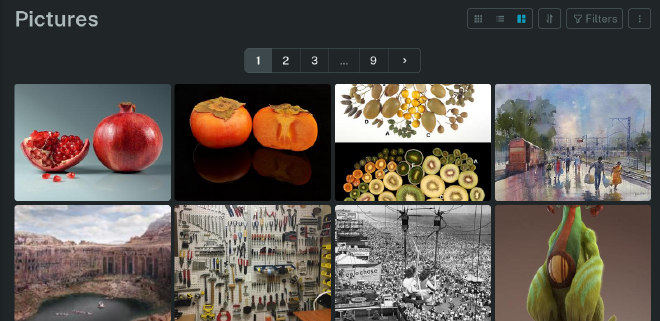
Dude! It’s like a self-hosted mood board! For 10 years now, I’ve been occasionally adding gorgeous art and little delights to my Reddit saves. This was really not ideal, though, because of both Reddit link rot and, just, not actually “owning” a copy of that data. I was definitely feeling anxious about this. There were a lot of treasures there (r/museum and r/UtterlyUniquePhotos and r/ImaginaryLandscapes, my loves). But! With Readeck, it was easy peasy to save all these gorgeous pieces of art - with attribution and a link to what they are - into a lovely self-hosted gallery! WONDERFUL.
Surprise #2: Readeck for work research#
Today, I had a major brainwave. I wanted to learn a bit more about sequential testing. My normal workflow here would be to, first, collect some things to read or watch: ideally, academic articles, industry blog posts, YouTube lectures, and documentation. I would normally dump all these links into my Obsidian, take my notes there and drop a link to what I read. With blog posts, especially, I’ve been annoyed that I can’t highlight. Well, today, I realized… I can.
So, new workflow:
- Instead of dumping everything I found into an Obsidian “reading list” note, I saved them all to Readeck.
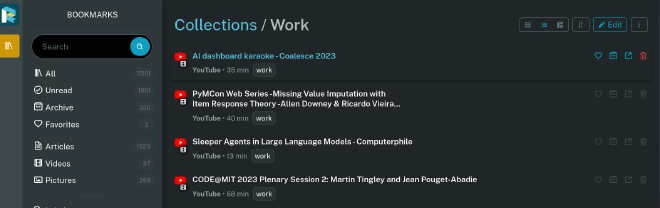
- In Readeck, I created a collection for work-related readings. I loved this because I could group together articles and videos. I could also label them (manually… LLM would be nice here…) and get time estimates. For videos, I could also immediately get the transcript (of so-so quality). And it was all searchable! Glory be.
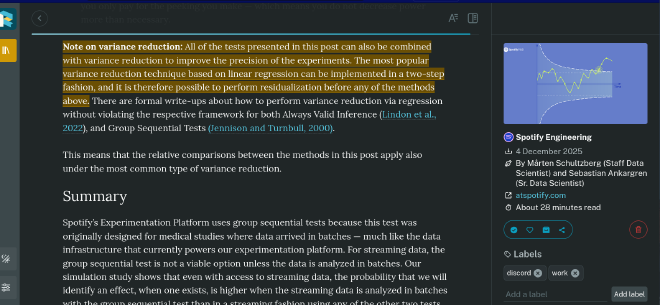
- Finally, I could highlight these posts at my leisure - and view those highlights on their own, in their own highlights tab. (I can imagine using this for quickly generating Anki cards.)
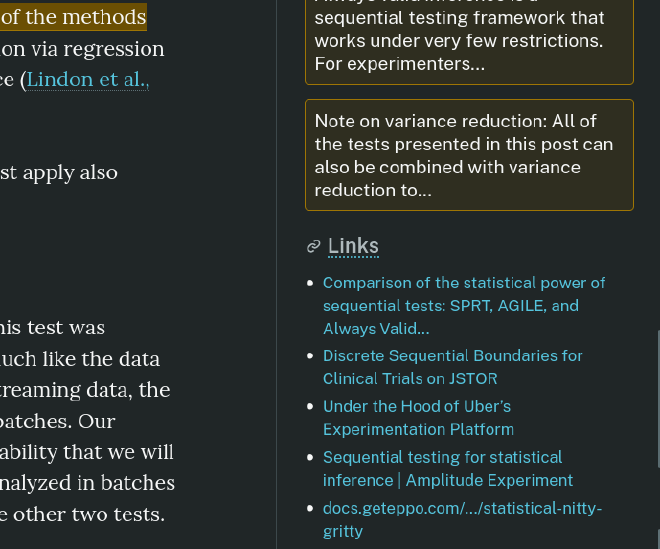
- I really loved the informative sidebar that Readeck has in its UI (bravissimi, devs) - telling me the authors, the original link, the posting date. But I just discovered the coup de grace: an outbound links list at the end! 👏🏻
This was really wonderful, and made accumulating knowledge for my, ahem, Knowledge Work, so much easier and more organized. Here’s some screenshots: